
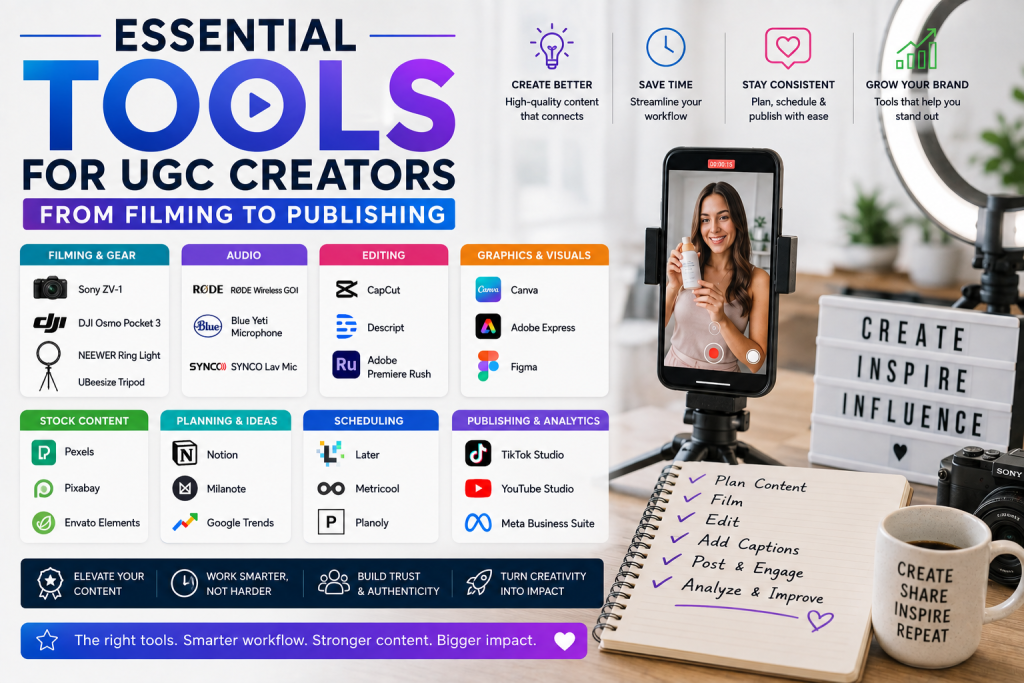
Essential Tools for UGC Creators: From Filming to Publishing
INTRODUCTION
User-Generated Content (UGC) creation has become a thriving career path. Brands are increasingly turning to UGC creators for authentic, relatable content that resonates with audiences. But creating high-quality UGC requires more than just a smartphone and creativity. The right tools can make the difference between content that converts and content that gets scrolled past. This guide covers the essential tools for UGC creators, from filming and editing to publishing and analytics.
FILMING EQUIPMENT
You do not need expensive equipment to succeed in UGC. Many successful creators use just a smartphone and natural lighting. However, a few key investments can significantly improve your content quality.
Smartphone: The most important tool for UGC creators is your smartphone. Modern smartphones have excellent cameras that can produce professional-quality video. The iPhone 15 Pro and Samsung Galaxy S24 Ultra are among the best for video production. Key features to look for include high resolution (4K), good low-light performance, and image stabilization.
Lighting: Good lighting is essential for professional-looking content. Natural lighting is often the best option. Position yourself facing a window to get soft, flattering light. For indoor shooting, consider a ring light. Ring lights provide even, flattering lighting and are affordable. They are ideal for talking-head videos and product shots. A softbox lighting kit is another option for more advanced creators. Softboxes produce soft, diffused light that minimizes harsh shadows. Key features to look for include adjustable brightness and color temperature.
Tripod and Mounts: A stable camera is essential for professional-looking video. A simple tripod or smartphone mount can significantly improve your content quality. A basic tripod is affordable and essential for steady shots. A ring light with a built-in phone mount is a convenient all-in-one solution. A flexible tripod like the Joby GorillaPod allows you to mount your phone almost anywhere. A handheld gimbal stabilizes your smartphone for smooth, cinematic movement.
Microphone: Good audio is just as important as good video. Smartphone microphones can pick up background noise and produce tinny sound. An external microphone is a worthwhile investment. A wireless lavalier microphone clips to your clothing and provides clear, consistent audio. It is ideal for talking-head videos. A shotgun microphone mounts on your camera or phone and captures directional audio. A USB microphone is ideal for voiceovers and studio recording.
VIDEO EDITING TOOLS
Editing is where raw footage becomes compelling content. The right editing tool can save you time and improve your content quality.
CapCut: CapCut is one of the most popular video editing apps for UGC creators. It is free, easy to use, and packed with features. CapCut offers trimming, cutting, and merging. It has filters and effects, text and captions, speed controls, and transitions. It also offers auto-captions and AI video generation. CapCut is available for both iOS and Android and is ideal for TikTok, Reels, and Shorts.
InShot: InShot is another popular mobile editing app. It offers a range of features, including trimming, cutting, merging, filters, effects, text, and stickers. InShot is available for both iOS and Android and is ideal for social media content.
Canva Video Editor: Canva is not just for graphic design. It now offers a video editor with a range of features, including trimming, cutting, merging, filters, effects, text, and music. Canva also offers AI-powered features like auto-captioning and video generation. It is available on desktop and mobile and is ideal for social media content.
Adobe Premiere Rush: Adobe Premiere Rush is a simplified version of Adobe Premiere Pro. It offers professional-grade editing on desktop and mobile. Adobe Premiere Rush offers trimming, cutting, merging, filters, effects, text, and music. It is ideal for creators who want professional-quality editing on a budget.
Descript: Descript is a powerful audio and video editing tool. It allows you to edit video by editing text. You can edit your audio like a document, remove filler words automatically, and add captions. Descript is ideal for podcasters and creators who want to edit quickly.
GRAPHIC DESIGN TOOLS
Visual assets like thumbnails, banners, and social media graphics are essential for UGC creators.
Canva: Canva is the most popular graphic design tool for non-designers. It offers drag-and-drop design, millions of templates, AI-powered design suggestions, and a brand kit for maintaining consistency. Canva is available on desktop and mobile and is ideal for social media graphics and thumbnails.
Adobe Express: Adobe Express is a simplified version of Adobe Creative Cloud. It offers graphic design, video editing, and web page creation. Adobe Express is ideal for creators who want professional-quality design without the learning curve.
SOCIAL MEDIA PUBLISHING TOOLS
Publishing and scheduling tools help you maintain a consistent posting schedule.
Buffer: Buffer is a social media management tool that allows you to schedule posts across multiple platforms. It offers content scheduling, analytics, and AI-powered caption suggestions. Buffer is ideal for creators who want to maintain a consistent posting schedule.
Later: Later is a social media scheduling tool designed for visual content. It offers drag-and-drop calendar, analytics, and user-generated content management. Later is ideal for Instagram and TikTok creators.
Hootsuite: Hootsuite is a comprehensive social media management tool. It offers scheduling, monitoring, analytics, and team collaboration. Hootsuite is ideal for creators and brands with multiple social media accounts.
PORFOLIO AND CLIENT MANAGEMENT TOOLS
Managing clients and showcasing your work is essential for UGC creators.
KILAUGC: KILAUGC is a platform that connects UGC creators with brands. It offers campaign management, portfolio showcasing, secure payments, and brand partnerships. KILAUGC is ideal for UGC creators looking to find paid work.
Contra: Contra is a commission-free freelance platform. It offers portfolio creation, client management, and payment processing. Contra is ideal for freelancers who want to avoid commission fees.
Notion: Notion is an all-in-one workspace. You can use it to manage projects, track clients, and showcase your portfolio. Notion is highly customizable and suitable for creators.
HOW TO CHOOSE THE RIGHT TOOLS
The right tools depend on your workflow, budget, and content style. Start with a smartphone and natural lighting. Invest in a tripod and microphone as you grow. Choose a video editing app that you are comfortable with. Use graphic design tools like Canva to create thumbnails and banners. Use social media scheduling tools to maintain a consistent posting schedule. The key is to integrate tools gradually and evaluate their impact on your productivity and content quality.
CONCLUSION
The right tools can make a significant difference in your UGC content quality and productivity. Start with the essentials—a smartphone, natural lighting, and a basic video editor. As you grow, invest in better equipment and tools. The key is to focus on creating content that resonates with audiences while using tools that streamline your workflow.
About the Author: The Financial Education Team is dedicated to helping individuals build strong financial foundations through clear, actionable guidance on credit, saving, and wealth-building.
Disclaimer: This article is for informational purposes only and should not be considered financial or investment advice. Always conduct your own research before using any tool or platform.