
Essential Cybersecurity Tools for Remote Workers and Creators
INTRODUCTION
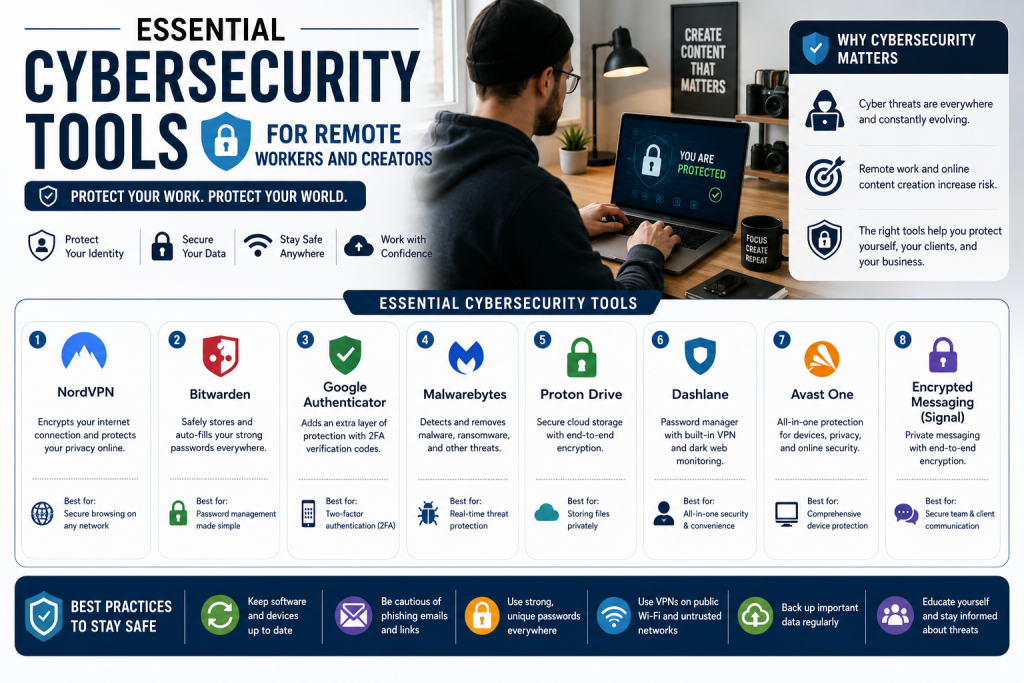
Working remotely offers freedom and flexibility, but it also exposes you to significant security risks. Public Wi-Fi, unsecured home networks, and the rise of sophisticated cyberattacks make remote workers and creators prime targets for hackers. One security breach can compromise your accounts, steal your identity, and damage your reputation. Protecting your digital life is not optional—it is essential. This guide covers the essential cybersecurity tools you need to stay safe while working remotely, from password managers to VPNs and beyond.
THE RISKS OF REMOTE WORK
Remote workers face unique security challenges. Public Wi-Fi networks are notoriously insecure. Hackers can intercept data transmitted over public networks, stealing passwords and sensitive information. Unsecured home networks can be vulnerable to attacks if not properly configured. Phishing attacks are increasingly sophisticated, targeting remote workers with fake emails and messages. Device theft is also a concern—a lost or stolen laptop can expose sensitive data. Weak passwords and password reuse are among the most common security vulnerabilities.
PASSWORD MANAGERS
Weak passwords are one of the biggest security risks. Many people use simple passwords or reuse the same password across multiple accounts. Password managers solve this problem by generating strong, unique passwords for every account and storing them securely.
LastPass is one of the most popular password managers. It stores your passwords securely and automatically fills them in when you need them. LastPass also generates strong passwords for new accounts and offers secure sharing with trusted contacts. It is available on desktop and mobile devices.
1Password is another top-tier password manager known for its strong security and user-friendly interface. It offers password storage, secure sharing, and a travel mode that removes sensitive data from your devices when you cross borders. 1Password is ideal for individuals and families.
Dashlane offers password storage, secure sharing, and a built-in VPN for additional security. It also monitors the dark web for your personal information and alerts you if your data is compromised. Dashlane is a comprehensive security solution.
KeePass is a free, open-source password manager. It stores your passwords locally, giving you complete control over your data. KeePass is ideal for users who prefer not to store their passwords in the cloud.
VPN (VIRTUAL PRIVATE NETWORK)
A VPN encrypts your internet connection, protecting your data from hackers, especially on public Wi-Fi. It also hides your IP address and location, making it harder for websites to track you. A VPN is essential for any remote worker who uses public Wi-Fi or wants to protect their privacy.
NordVPN is one of the most popular VPN services. It offers strong encryption, a no-logs policy, and a wide range of server locations. NordVPN also offers additional features like malware protection and ad blocking.
ExpressVPN is known for its speed and reliability. It offers strong encryption, a no-logs policy, and 24/7 customer support. ExpressVPN is ideal for users who need fast, reliable connections.
Surfshark is a budget-friendly VPN that offers unlimited device connections. It offers strong encryption, a no-logs policy, and additional features like ad blocking and malware protection.
ProtonVPN is a security-focused VPN developed by the team behind ProtonMail. It offers strong encryption, a no-logs policy, and a free tier for basic use. ProtonVPN is ideal for users who prioritize privacy.
ANTI-VIRUS AND ANTI-MALWARE
Anti-virus and anti-malware software protect your devices from malicious software that can steal your data, damage your files, or hold your system hostage. This is especially important for creators who download files, install plugins, or use third-party tools.
Bitdefender is a comprehensive security suite that offers real-time protection against viruses, malware, and ransomware. It also includes a VPN and performance optimization tools. Bitdefender is ideal for users who want all-in-one protection.
Malwarebytes is a specialized anti-malware tool that excels at detecting and removing malware. It works alongside your regular anti-virus software, providing an extra layer of protection. Malwarebytes is ideal for users who want targeted malware protection.
Norton is a well-established security suite that offers comprehensive protection against viruses, malware, and identity theft. It also includes a VPN and password manager. Norton is ideal for users who want a trusted, all-in-one solution.
TWO-FACTOR AUTHENTICATION (2FA)
Two-factor authentication adds an extra layer of security to your accounts. Even if a hacker steals your password, they cannot access your account without the second factor. 2FA can be implemented through authenticator apps, SMS, or hardware keys.
Google Authenticator is a simple, free authenticator app that generates time-based codes for your accounts. It works offline, making it a reliable option. Google Authenticator is ideal for users who want a basic, free 2FA solution.
Authy is an authenticator app that offers additional features like cloud backup and multi-device support. It is more secure than SMS-based 2FA and offers a better user experience. Authy is ideal for users who want a more robust 2FA solution.
YubiKey is a hardware security key that provides the highest level of 2FA security. It is phishing-resistant and works with many popular services. YubiKey is ideal for users who want the most secure 2FA option.
SECURE FILE SHARING AND STORAGE
File sharing and storage tools should protect your data both in transit and at rest. Unsecured file sharing can expose sensitive business information to hackers or competitors.
Google Drive offers file storage and sharing with encryption both in transit and at rest. It integrates with Gmail and Google Workspace, making it convenient for remote workers. Google Drive is ideal for users who want a simple, integrated solution.
Dropbox is a popular file storage and sharing platform with strong security features, including encryption and two-factor authentication. Dropbox is ideal for users who want a reliable, secure file-sharing solution.
ProtonDrive is a security-focused file storage service from the team behind ProtonVPN and ProtonMail. It offers end-to-end encryption, meaning even Proton cannot access your files. ProtonDrive is ideal for users who prioritize privacy.
SECURE COMMUNICATION TOOLS
Communication tools should also be secure, especially for sensitive business discussions. Unsecured communication channels can be intercepted by hackers or government surveillance.
Signal is a secure messaging app that offers end-to-end encryption for messages and calls. It is open-source and audited by security experts. Signal is ideal for users who want the most secure messaging option.
WhatsApp offers end-to-end encryption by default, protecting your messages and calls from interception. It is widely used and convenient for business communication. WhatsApp is ideal for users who want a secure, widely used messaging app.
Zoom offers end-to-end encryption for meetings and supports waiting rooms and password protection. Zoom is ideal for users who need secure video conferencing.
REGULAR BACKUPS
Regular backups ensure you do not lose important files in the event of a cyberattack, device failure, or theft. Backups should be stored in multiple locations, including cloud storage and external hard drives.
Backblaze offers unlimited cloud backup for a single device. It automatically backs up your files and keeps versions of deleted files for up to 30 days. Backblaze is ideal for users who want a simple, affordable backup solution.
Google Drive and Dropbox provide file synchronization and version history, giving you access to previous versions of your files. This can be a useful backup option for users who already use these services.
HOW TO GET STARTED WITH CYBERSECURITY
Start with the most critical security tools. A password manager is the most important tool because weak passwords are the most common vulnerability. A VPN is also essential, especially if you use public Wi-Fi. Two-factor authentication should be enabled on all accounts that support it. Anti-virus and anti-malware software protects your devices. Secure communication tools should be used for sensitive business discussions. Regular backups ensure you do not lose important files. As your business grows, you can add more sophisticated security measures.
CONCLUSION
Cybersecurity is essential for remote workers and creators. A single security breach can compromise your accounts, steal your identity, and damage your reputation. The right tools can protect your digital life and give you peace of mind. Start with a password manager, enable two-factor authentication, use a VPN on public Wi-Fi, and regularly back up your files. Your security is in your hands.
About the Author: The Financial Education Team is dedicated to helping individuals build strong financial foundations through clear, actionable guidance on credit, saving, and wealth-building.
Disclaimer: This article is for informational purposes only and should not be considered financial or investment advice. Always conduct your own research before using any tool or platform.